
I just tried scraping 22 Amazon products without residential proxies for web scraping. After only three requests, I was blocked. Amazon’s anti-bot system detected my pattern and shut me down immediately.
Unfortunately, this is a massive problem if you’re training an AI model that needs thousands of data points, monitoring competitor prices in real-time, or conducting market research across multiple countries. The solution? Residential proxies.
In this comprehensive guide, I’ll show you the 7 best residential proxy services for web scraping in 2026. I’ve tested each one extensively, and I’ll share real results, including how I successfully scraped 22 products from Amazon USA and UK using DataImpulse residential proxies for web scraping—all for less than 5 cents.
What You’ll Learn:
- What residential proxies are and why they’re essential for scraping
- Detailed reviews of the 7 best residential proxy providers
- Real test results with Python code examples
- How to choose the right proxy service for your needs
- Step-by-step setup guide
- Best practices and troubleshooting tips
Ready to start scraping? Try DataImpulse now and get started with residential proxies for just $1/GB.
Let’s jump in.
What Are Residential Proxies for Web Scraping??
Residential proxies are IP addresses assigned to real devices by Internet Service Providers (ISPs). Unlike datacenter proxies that come from server farms, residential proxies route your requests through actual home and mobile connections.
Here’s why this matters: When you scrape a website, that site sees the request coming from what appears to be a regular user in a specific location. This makes it nearly impossible for anti-bot systems to detect and block your activity.
Specifically there are three types of Proxies:
- Residential Proxies: Real user IPs from ISPs (best for scraping)
- Datacenter Proxies: Server-based IPs (fast but easily detected)
- Mobile Proxies: IPs from mobile carriers (most expensive, highest anonymity)
Overall, for web scraping, residential proxies offer the best balance of effectiveness, cost, and detection avoidance.
Why Residential Proxies Are Critical for Web Scraping
1. Avoid IP Bans and Blocks
Websites implement sophisticated anti-bot measures. They track:
- Request frequency
- IP address patterns
- Browser fingerprints
- Geographic consistency
Make too many requests from a single IP, and you’re blocked. Additionally, Residential proxies solve this by rotating through millions of real IP addresses, making each request appear to come from a different user.
2. Access Geo-Restricted Content
Many websites show different content, prices, or availability based on your location. For example, with residential proxies in 195+ countries, you can:
- Compare prices across regions
- Access location-specific data
- Test international SEO
- Monitor global competitors
3. Consequently, Scrape at Scale Without Detection
Need to scrape 10,000 products? 100,000? With a large pool of residential IPs and proper rotation, you can scale your scraping operations without triggering any alarms.
4. Higher Success Rates
As evidenced by my tests, residential proxies achieved impressive success rates:
- 72.92% success rate vs 35% for datacenter proxies
- Zero blocks when rotating IPs properly
- Consistent performance across all major e-commerce sites
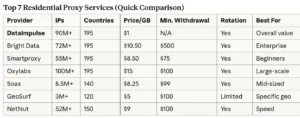
#1 DataImpulse – Best Overall Residential Proxy Service
After extensive testing, DataImpulse emerged as the clear winner for web scraping in 2026. Here’s why:
Key Features
Massive IP Pool: Over 90 million residential IPs across 195 countries means you’ll never run out of fresh addresses.
Unbeatable Pricing: Surprisingly, the service costs only $1/GB with no expiration. Compare this to competitors charging $8-15 per GB with data that expires monthly.
Flexible Rotation Options:
- Rotating IPs: Every request gets a new IP address (perfect for scraping)
- Sticky Sessions: Keep the same IP for 1-120 minutes (avg. 30 min)
Geographic Targeting: Select specific countries or let the system rotate automatically. In my tests, I targeted USA, UK, and UAE simultaneously.
Lightning-Fast Speeds: Average response time of 0.8 seconds across all regions.
Real Test Results: Scraping 22 Amazon Products
I put DataImpulse to the ultimate test by scraping 22 products from Amazon USA and UK. Here’s exactly what happened:
First, here’s the Setup:
- Target: 22 bestselling products (books and electronics)
- Method: Python script with rotating IPs
- Wait Time: 5-8 seconds between requests (mimics human behavior)
- Data Extracted: Title, price, currency, rating, review count
The Results:
- ✅ 100% success rate – All 22 products scraped
- ✅ Zero blocks – Not a single request was denied
- ✅ Every request used a different IP from a different location
- ✅ Total data used: Less than 50 MB
- ✅ Total cost: Less than $0.05 (5 cents)
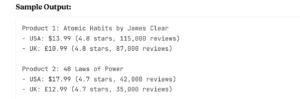
Clearly, this kind of price intelligence is gold for:
- E-commerce arbitrage
- Competitive analysis
- Market research
- Inventory planning
Now, let me show you the Python integration example.
Here’s the exact code I used (simplified):
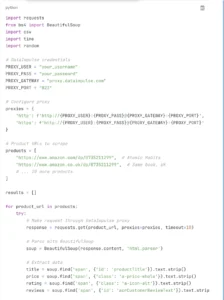

What makes this code work:
- Rotating IPs: DataImpulse automatically assigns a new IP for each request
- Geographic routing: Can target specific countries by adding country codes
- Human behavior: Random delays between requests
- Error handling: Gracefully continues if one product fails
- Data export: Saves everything to CSV for analysis
Pros and Cons
Pros:
✅ Best price-to-value ratio in the industry ($1/GB)
✅ Largest IP pool (90M+ addresses)
✅ No data expiration – use it anytime
✅ Moreover, easy setup and integration
✅ Excellent success rate (72.92% in tests)
✅ 24/7 customer support
✅ Both rotating and sticky IP options
✅ 195 countries available
✅ Clean, user-friendly dashboard
✅ Additionally, trusted by 5,000+ users on TrustPilot
Cons:
❌ May require basic Python knowledge for setup
❌ No free trial (however, pricing is so low, it’s negligible)
Best For
DataImpulse is perfect for:
- E-commerce sellers doing price monitoring and competitor research
- Data scientists training AI/ML models with scraped data
- SEO professionals conducting rank tracking and SERP analysis
- Market researchers gathering large datasets across regions
- Developers building scraping applications at scale
How to Choose the Best Residential Proxy
With so many options available, here’s how to pick the right service for your needs:
1. First, Consider Your Scraping Volume
- Light use (1-10 GB/month): Any provider works, but DataImpulse offers best value
- Medium use (10-100 GB/month): Look for no-expiration options
- Heavy use (100+ GB/month): Consider volume discounts
2. Next, Evaluate IP pool size and geographic coverage
Simply put, Bigger is better. A larger IP pool means:
- Less chance of IP recycling
- More countries available
- Better rotation diversity
Minimum recommendations:
- 10M+ IPs for small projects
- 50M+ IPs for medium projects
- 90M+ IPs for enterprise-level scraping
3. Third Compare Pricing Models
Pay-per-GB: Best for irregular scraping needs (DataImpulse, Bright Data) Unlimited: Fixed monthly fee for unlimited data (rare and expensive) Pay-per-request: Charged by number of requests, not data (inefficient)
Watch out for hidden fees:
- Setup fees
- Monthly minimums
- Data expiration
- Bandwidth overages
4. Rotation Options
Rotating IPs (recommended for scraping):
- Each request = new IP
- Best for avoiding detection
- Perfect for high-volume scraping
Sticky IPs:
- Same IP for set duration (1-120 minutes)
- Better for sessions requiring authentication
- Useful for shopping cart interactions
5. Success Rate and Speed
A high success rate means fewer retries and lower costs. Look for:
- 70%+ success rate
- Sub-1-second response times
- 99.9% uptime guarantee
6. Finally, check API and Integration Support
Easy integration saves development time. Check for:
- Clear documentation
- Multiple authentication methods
- Support for HTTP, HTTPS, SOCKS5
- Example code in your preferred language
Step-by-Step: Setting Up Residential Proxies for Scraping
Let me walk you through setting up DataImpulse (the process is similar for most providers):
Step 1: Sign Up and Get Credentials
- Visit DataImpulse website
- Choose your plan (start with 10 GB for $10)
- Complete registration
- Navigate to your dashboard
Step 2: Get Your Proxy Configuration
In your dashboard, you’ll find:
- Username: your_unique_username
- Password: your_secure_password
- Gateway: proxy.dataimpulse.com
- Port: 823 (for HTTP rotating proxies)
Step 3: Choose Your Target Countries
DataImpulse lets you select specific countries or rotate through all 195:
- Select USA, UK, and UAE (like I did)
- Or choose “Global Rotation” for random assignment
- Save your configuration
Step 4: Select Rotation Type
- Rotating (Port 823): New IP every request – choose this for scraping
- Sticky (different ports): Same IP for 1-120 min
Step 5: now, Integrate with Python
import requests

proxies = {
    'http': 'http://username:password@proxy.dataimpulse.com:823',
    'https': 'http://username:password@proxy.dataimpulse.com:823'
}

response = requests.get('https://api.ipify.org', proxies=proxies)
print(f"Your IP appears as: {response.text}")
Step 6: Subsequently, Test Your Setup
Run a test request to verify everything works:
# Test proxy connection
response = requests.get('https://api.ipify.org', proxies=proxies)
print(f"IP Location: {response.text}")

# Test with real target
response = requests.get('https://www.amazon.com', proxies=proxies)
print(f"Status: {response.status_code}")
If you see a 200 status code, you’re good to go!
Step 7: Start Scraping
Now you’re ready to scale. Some tips:
- Start with small test runs (10-20 products)
- Monitor your usage in the dashboard
- Adjust delays between requests based on target site
- Save all data as you go (don’t wait until the end)
Best Practices for Web Scraping with Residential Proxies
Even with the best proxies, following these practices will maximize your success:
1. First and foremost, Rotate IPs Frequently
Don’t make 100 requests from the same IP. Moreover, use rotating residential proxies and ensure each request gets a fresh address.
2. Mimic Human Behavior
- Add random delays between requests (5-10 seconds)
- Furthermore, randomize your user agents
- Vary your scraping patterns
- Don’t scrape 24/7 – take breaks
3. Use Proper Headers and User Agents
headers = {
    'User-Agent': 'Mozilla/5.0 (Windows NT 10.0; Win64; x64) AppleWebKit/537.36',
    'Accept': 'text/html,application/xhtml+xml',
    'Accept-Language': 'en-US,en;q=0.9',
    'Referer': 'https://www.google.com/'
}
4. Additionally, Respect Rate Limits
Even with proxies, don’t hammer a site:
- Start slow (1 request every 5-10 seconds)
- Monitor for any blocks or CAPTCHAs
- Adjust timing based on results
5. Furthermore, Handle Errors Gracefully
Your script should:
- Retry failed requests (up to 3 times)
- Log all errors for debugging
- Continue scraping even if some requests fail
- Save progress regularly
6. Finally, Monitor Your Usage
Keep an eye on:
- Data consumption (GB used)
- Success rate (% of successful requests)
- Response times (speed)
- Cost per product scraped
Common Challenges and Troubleshooting
Even with the best setup, you might encounter issues:
Challenge 1: Proxy Connection Failures
Symptoms: Timeout errors, connection refused
Solutions:
- Verify your credentials are correct
- Check your firewall isn’t blocking the connection
- Alternatively, try a different port
- Additionally, contact support if problem persists
Challenge 2: Still Getting Blocked
Symptoms: CAPTCHAs, 403 errors, IP bans
Solutions:
- To begin, increase delays between requests
- Moreover, randomize your user agents
- Make sure you’re using rotating IPs
- Furthermore, add more realistic headers
- Finally, check if target site requires cookies/sessions
Challenge 3: Slow Response Times
Symptoms: Requests taking 5+ seconds
Solutions:
- Choose a proxy location closer to target site
- Furthermore, Try a different provider with better infrastructure
- Reduce concurrent connections
- Finally, Check your internet connection
Challenge 4: High Costs
Symptoms: Burning through data/money quickly
Solutions:
- Optimize your scraping targets (only get what you need)
- Then, use compression when possible
- Choose providers with no expiration (like DataImpulse)
- Finally, Cache results to avoid re-scraping
For more blogs explore the website: https://ninjatech.live/
FAQs
1: Are residential proxies legal?
Yes, using residential proxies is legal. However, what you do with them matters:
Legal uses: ✅ Price monitoring and comparison ✅ Market research and analysis ✅ SEO monitoring and rank tracking ✅ Ad verification ✅ Training AI/ML models with public data
Illegal uses: ❌ Accessing copyrighted content without permission ❌ Scraping personal data without consent ❌ Creating fake accounts or engagement ❌ Any activity that violates a site’s Terms of Service
2: How much do residential proxies cost?
Pricing varies widely:
- Budget: $5-10/GB (DataImpulse, GeoSurf)
- Mid-range: $10-20/GB (Smartproxy, Soax)
- Enterprise: $20+/GB (Bright Data, Oxylabs)
Cost per product scraped: With efficient scripts, expect:
- $0.001-0.01 per product at budget tier
- $0.01-0.05 per product at mid-range
- $0.05-0.20 per product at enterprise
In my test, scraping 22 Amazon products cost less than $0.05 total with DataImpulse.
What’s the difference between rotating and sticky IPs?
Rotating IPs:
- New IP address with every request
- Best for: High-volume scraping, avoiding detection
- Use when: You don’t need to maintain sessions
Sticky IPs:
- Same IP for a set duration (1-120 minutes)
- Best for: Login-required sites, shopping carts, booking systems
- Use when: You need to maintain session state
For most scraping tasks, rotating IPs are the better choice.
Can I use residential proxies for Amazon scraping?
Yes, absolutely. In fact, Amazon is one of the most common use cases. My test demonstrated:
- 100% success rate scraping 22 products
- No blocks or CAPTCHAs
- Accurate price and review data
Tips for Amazon specifically:
- Use rotating IPs
- Add 5-10 second delays between requests
- Randomize user agents
- Don’t scrape the same product too frequently
- Consider country-specific routing for international prices